
From Socket to Scope
Learn how Uvicorn transforms raw TCP bytes into structured ASGI scopes your FastAPI app can use.


What Uvicorn Does
In the previous post, we looked at raw HTTP requests, the text and bytes sent on the wire. But your FastAPI app doesn’t receive raw text. It gets a structured dictionary called a scope plus async channels for input and output.

This post explains how Uvicorn bridges that gap:
- How the operating system delivers bytes via sockets.
- How Uvicorn parses them into an ASGI scope.
- How requests and responses are passed through
receiveandsend.
From client to socket
When a client makes a request:
- The kernel receives bytes into a socket queue.
- Uvicorn calls system calls like
socket,bind,listen,acceptto open a listening port. - Accepted connections deliver byte streams to Uvicorn’s HTTP parser.
We won’t dive into kernel internals, but keep in mind: Uvicorn just reads from a TCP socket like any other server.
Uvicorn parsing
Uvicorn runs an HTTP parser (based on httptools) that:
- Splits the request into method, path, version.
- Parses headers into
(name, value)byte pairs. - Keeps the body as a stream of chunks.
From this, Uvicorn builds an ASGI scope, a dict describing the request.
Example: ASGI scope
Here’s a scope for a POST /upload with JSON:
{
  "type": "http",
  "asgi": {"version": "3.0"},
  "http_version": "1.1",
  "method": "POST",
  "scheme": "http",
  "path": "/upload",
  "raw_path": b"/upload",
  "query_string": b"",
  "headers": [
    (b"host", b"example.com"),
    (b"content-type", b"application/json"),
    (b"content-length", b"18"),
  ],
  "client": ("127.0.0.1", 54321),
  "server": ("127.0.0.1", 8000),
}
This is the structured representation your app receives before reading the body.
Mapping wire parts to scope fields
The ASGI call
Every ASGI app follows the same entry point:
async def app(scope, receive, send):
    print("Scope:", scope)
    await send({
        "type": "http.response.start",
        "status": 200,
        "headers": [(b"content-type", b"text/plain")],
    })
    await send({
        "type": "http.response.body",
        "body": b"Hello from ASGI",
    })
Key points:
scopedescribes the request.receivedelivers body chunks as events.sendsends response events back to Uvicorn.
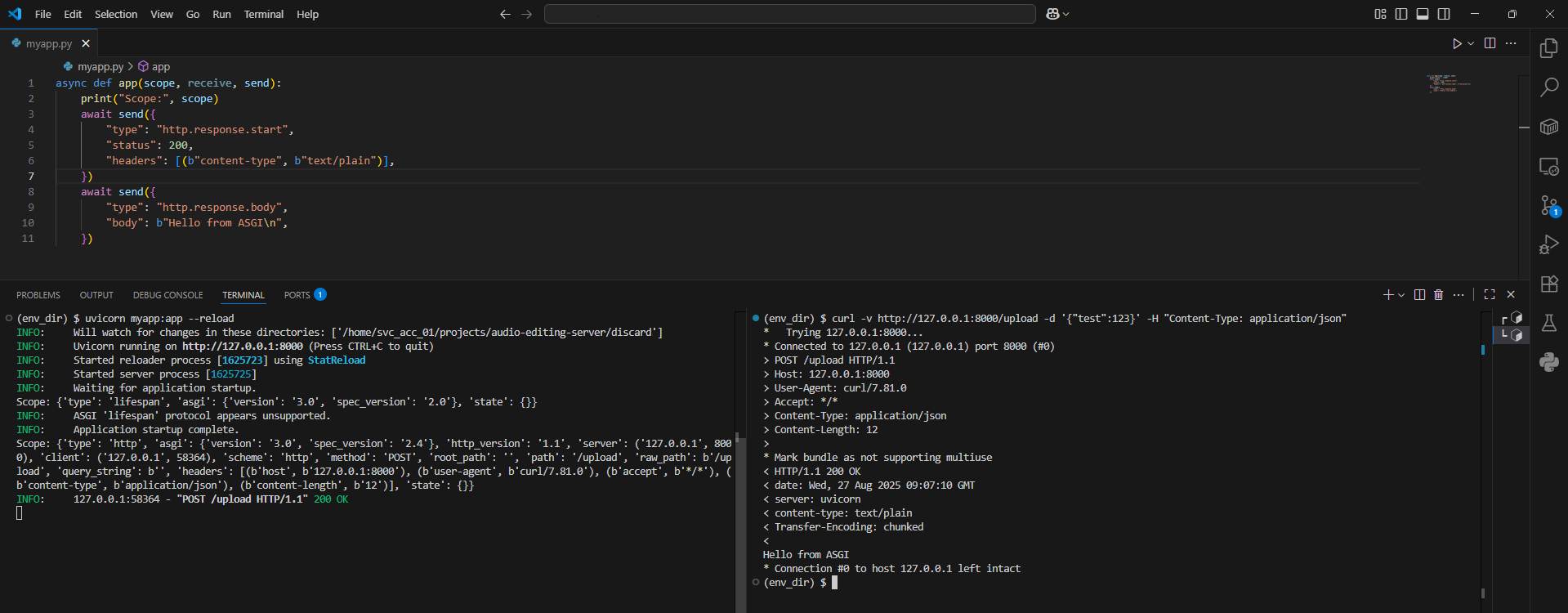
Run it yourself
Try running a minimal ASGI app with Uvicorn:
uvicorn myapp:app --reload
Replace myapp:app with the file and function name from above. Then hit it with curl:
curl -v http://127.0.0.1:8000/upload -d '{"test":123}' -H "Content-Type: application/json"
You’ll see the scope printed in your console.
| Wire data | Scope field | Example |
|---|---|---|
| Method | scope["method"] | POST |
| Path | scope["path"] | /upload |
| Headers | scope["headers"] | (b"content-type", b"application/json") |
Uvicorn’s job is to turn raw TCP byte streams into a structured ASGI scope and provide async channels for bodies and responses. This gives a clean interface that frameworks like Starlette and FastAPI can build on.
In the next post, we’ll dig deeper into ASGI events: how requests and responses actually flow through receive and send.